

AI for Students: The Ultimate Guide to Smarter Studying, Researching, and Writing
The academic landscape in 2026 looks vastly different than it did just a few years ago. The question is no longer whether students should use artificial intelligence, but how they can use it ethically, effectively, and strategically to enhance their learning. Passing off AI generated text as your own will get you flagged by academic integrity boards instantly; however, utilizing AI as a personalized 24/7 tutor, literature reviewer and structural editor is the ultimate academic cheat code.
If you are a high schooler, an undergraduate juggling five courses, or a Ph.D. candidate staring down a 10,000-word dissertation, this comprehensive guide will break down the absolute best AI tools for students currently available.
We will avoid vague descriptions. Instead, we are looking at how each platform operates, their specific workflows, real world practical examples, and where you can access them.
Category 1: Academic Writing & Literature Review Assistants
Writing an essay or thesis is often a highly stressful part of academic life. These specialized AI tools help you brainstorm, structure, check grammar, and most importantly ensure every single claim you make is backed by a verifiable, peer reviewed source.
1. Jenni AI: The Precision Academic Writer
Unlike generic chatbots that make up citations out of thin air, Jenni AI is built specifically for academic writing. It acts as an interactive co-writer that helps you expand your thoughts while forcing everything to remain grounded in actual published literature.
How It Works & Nature of Work:
Jenni AI uses a specialized text editor interface synced with a massive database of over 200 million academic papers. As you type a sentence, its predictive autocomplete engine suggests the next line. However, every time it suggests a major claim, it forces an inline citation in your preferred style (APA 7th, MLA, Harvard, Chicago, etc.). It also features an “Ask Your Library” chat, allowing you to upload your own custom PDFs and build arguments exclusively from those files.
Real World Student Example:
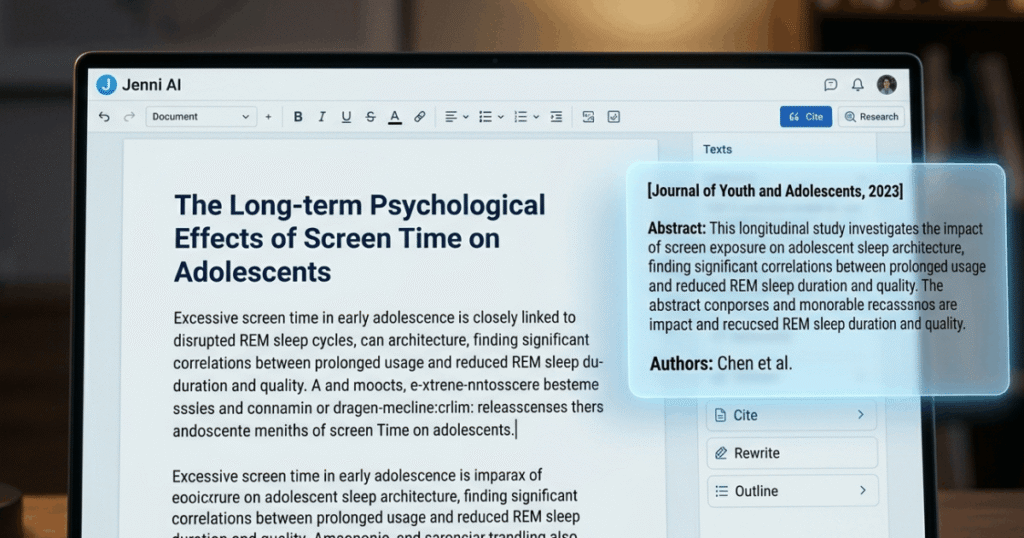
Imagine you are writing a literature review on “The Long term Psychological Effects of Screen Time on Adolescents.”
- The Execution: You type into Jenni AI: “Excessive screen time in early adolescence is closely linked to disrupted REM sleep cycles.”
- The AI Response: Jenni AI’s autocomplete instantly offers to finish your paragraph with contextually accurate phrasing and automatically attaches an interactive inline citation pointing directly to a 2023 study published in the Journal of Youth and Adolescence. You can click on the citation to read the exact abstract paragraph to verify it before keeping it in your paper.
2. Perplexity AI: The Search Engine That Cites Its Sources
Google search can feel cluttered with ads and SEO optimized blogs. Perplexity AI bypasses the clutter by working as a conversational answer engine that reads the internet in real time and provides synthesized answers with immediate footnotes.
How It Works & Nature of Work:
Perplexity acts as a hybrid between a web crawler and a large language model. When a student enters a query, the AI searches the web, filters out low-authority blogs, extracts the key data points from reputable sources, and writes a concise summary. For students, the most crucial feature is the “Academic” focus mode, which restricts the AI’s search perimeter entirely to scholarly journals, peer-reviewed articles, and databases like Semantic Scholar.
Real World Student Example:
You are preparing for a political science debate and need to know the core arguments surrounding universal basic income (UBI) experiments in Europe.
- The Execution: You toggle Perplexity to “Academic Mode” and type: “What were the measured labor market outcomes of the Finnish UBI experiment?”
- The AI Response: Perplexity will not give you an unsourced opinion. It will output a 3-paragraph summary stating that the experiment showed minor impacts on employment but significant improvements in mental well-being. Crucially, every single sentence will have a clickable bracketed number (e.g., [1], [2]) that leads directly to the official Kela (Social Insurance Institution of Finland) reports.
3. Paperpal: The Ultimate Journal-Grade Editor
While tools like Grammarly fix standard spelling mistakes, Paperpal is trained on millions of successful journal manuscripts. It is explicitly engineered to turn casual student writing into highly formal, publication-ready academic prose.
How It Works & Nature of Work:
Paperpal functions via a web editor or a direct plug-in for Microsoft Word and Google Docs. It scans your text not just for comma splices, but for structural academic vocabulary, technical consistency, and tone. It features an AI Paraphraser that trims wordy sentences down to meet strict assignment word counts while checking for potential accidental plagiarism.
Real World Student Example:
A student writes a sentence in their biology lab report: “We threw the chemical mix into the beaker and noticed it turned super blue real quick, which means the acid was strong.”
- The Execution: The student highlights the sentence and clicks Paperpal’s “Academic Tone” tool.
- The AI Response: Paperpal instantly restructures the sentence to: “Upon introducing the chemical compound into the beaker, a rapid colorimetric shift to deep blue was observed, indicating a highly acidic solution.” It completely transforms high school level phrasing into collegiate level output.
Category 2: Source Synthesis & Note Taking Automation
The sheer volume of reading material assigned in modern courses can easily cause burnout. These tools are designed to organize your lecture materials, summarize massive textbooks, and extract actionable data in seconds.
1. Google NotebookLM: Your Private Grounded Knowledge Base
NotebookLM is one of the most powerful free resources available to students. It eliminates the risk of AI “hallucinations” because it restricts the AI from using the open internet; it can only answer questions using the documents you choose to upload.
How It Works & Nature of Work:
You open a digital notebook and upload up to 50 sources at once including lecture PDFs, downloaded textbook chapters, raw audio recordings of your classes, or even YouTube links. NotebookLM instantly indexes all of this data. It can then generate study guides, flashcards, timelines, and even an automated, highly realistic two-host podcast audio file discussing your notes.
Real World Student Example:
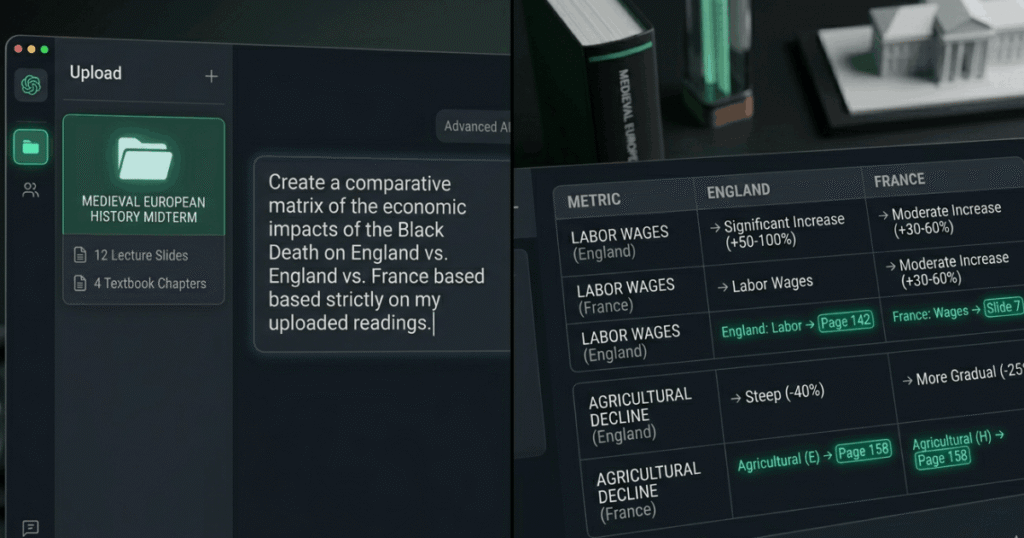
You are studying for a massive midterm in Medieval European History and have uploaded 12 different lecture slides and 4 chapters of a dense textbook.
- The Execution: Instead of flipping through hundreds of pages, you type into NotebookLM: “Create a comparative matrix of the economic impacts of the Black Death on England vs. France based strictly on my uploaded readings.”
- The AI Response: NotebookLM creates a clean, structured table comparing the two nations, complete with direct source citations linking back to the exact page numbers of the textbook chapters you uploaded.
2. NoteGPT: The Lecture & Video Summarizer
Attending 2-hour lectures or watching long educational YouTube series can result in information overload. NoteGPT specializes in capturing, transcribing, and summarizing audio visual educational content instantly.
How It Works & Nature of Work:
NoteGPT relies heavily on advanced speech-to-text algorithms and structured synthesis. You feed the platform a link to an educational video, an uploaded Zoom lecture recording, or an audio clip from your phone. Within seconds, the AI separates speakers, transcribes the audio with timestamp precision, and generates a structured summary broken down into core concepts, definitions and action items.
Real World Student Example:
Your professor posts a mandatory 90-minute guest lecture video on “Advanced Quantum Computing Architectures.” You don’t have the time to sit through the entire video before your morning quiz.
- The Execution: You paste the video link into NoteGPT.
- The AI Response: The platform generates a beautifully organized outline. It lists the “Top 5 Takeaways,” a glossary of technical terms mentioned by the speaker (like qubits, quantum decoherence, and superposition), and provides an interactive mind map that visually links the sub-topics together.
Category 3: STEM, Math, & Computational Solvers
Large language models like ChatGPT are naturally conversational, which means they can occasionally struggle with advanced math logic. For students in Science, Technology, Engineering, and Math (STEM), specialized algorithmic computational engines are required.
1. Wolfram Alpha: The Precise Computational Engine
Unlike generative text models that simply guess the next word based on probability, Wolfram Alpha uses a vast mathematical knowledge base and algorithms to compute exact answers. It is inherently incapable of making up math facts.
How It Works & Nature of Work:
Wolfram Alpha accepts mathematical expressions, chemical equations, and physics queries in natural language or standard computational syntax. It breaks down the problem using internal, rule-based algorithms and outputs step-by-step calculus solutions, statistical graphs, and chemical structure models.
Real World Student Example:
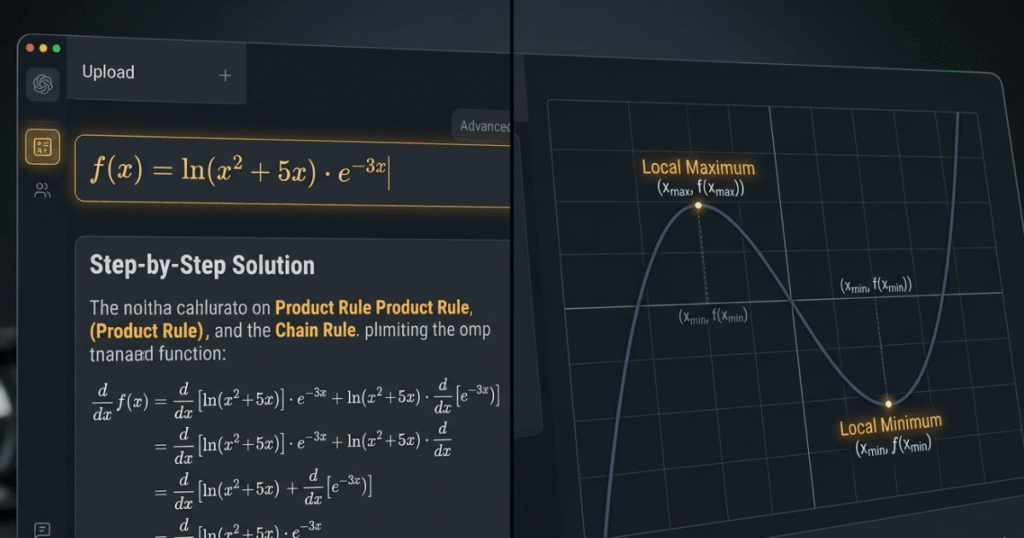
An engineering student needs to solve a complex derivative problem: $f(x) = \ln(x^2 + 5x) \cdot e^{-3x}$.
- The Execution: The student types the formula directly into Wolfram Alpha and requests the step-by-step solution.
- The AI Response: Instead of just giving the final answer, Wolfram Alpha shows every mathematical step required to reach the conclusion, applying the Product Rule and Chain Rule explicitly. It plots the function on a 2D graph and provides the local maximum and minimum coordinates, turning a frustrating homework problem into a visual math lesson.
Comprehensive Comparison: Finding Your AI Core Stack
To make things easy to analyze at a glance, here is a master structural matrix of how student tools stack up against each other:
AI Tool | Primary Academic Function | Best Core Feature | Ideal Student Use Case | Free Plan Availability |
Jenni AI | Essay & Thesis Writing | Autocomplete with Real Citations | Writing lengthy term papers | Yes (Basic daily quota) |
Perplexity AI | Academic Literature Sourcing | Dedicated Scholar Search Filter | Replacing basic Google search | Yes (Highly usable free tier) |
Paperpal | Scientific Copy-Editing | Advanced Academic Tone Corrector | Polishing lab reports and theses | Yes (Limited monthly edits) |
NotebookLM | Personal Study Grounding | Audio/Podcast Note Generation | Cramming for complex midterms | Yes (100% Free via Google) |
NoteGPT | Multi-media Note Automation | YouTube Video Transcription | Managing recorded lectures | Yes (Basic credits included) |
Wolfram Alpha | Algorithmic Math & STEM Solving | Step-by-Step Computational Math | Calculus, Physics, and Chemistry | Yes (Basic text answers free) |
How to Build an Ethical, High Impact AI Study Workflow
To maximize your GPA while ensuring you stay fully aligned with your institution’s academic integrity policies, you should view AI as your assistant, not your ghostwriter. Here is the ideal step-by-step framework to handle any research paper or major assignment:
Phase 1: Deep Discovery & Exploration
Never start an assignment by asking ChatGPT to write an outline. Instead, open Perplexity AI in Academic Mode. Input your thesis idea and read through the sourced journal papers that it uncovers. Download the original, full-text PDFs of the most compelling studies.
Phase 2: Knowledge Ingestion & Synthesis
Take those downloaded PDFs, along with your professor’s lecture slides, and upload them into Google NotebookLM. Spend an hour interacting with the files. Ask the notebook to identify conflicting theories among the authors, highlight critical methodologies, and extract key statistical figures. This builds a genuine understanding of the topic in your mind.
Phase 3: Structured Drafting
Open Jenni AI and copy your custom notes into the workspace. Use your own voice to write the core arguments of your paper. When you hit a roadblock or struggle to articulate a highly complex academic connection, let the AI autocomplete assist you, making sure to immediately verify and attach the suggested peer-reviewed citation.
Phase 4: Final Polish & Verification
Once your full draft is complete, paste the text into Paperpal. Run the tone corrector to eliminate any overly casual language, check for run-on sentences, ensure your vocabulary matches standard scholarly expectations, and double-check that your work reads smoothly and professionally.
Frequently Asked Questions (FAQ) for Students
Q: Will using these AI tools get me caught by AI detectors like Turnitin?
A: If you ask an AI tool to write an entire essay for you from scratch, copy paste it, and turn it in, yes, you will get caught. Turnitin and similar institutional checkers look for highly predictable, robotic text patterns. However, if you use tools like Perplexity for finding sources, NotebookLM for analyzing your own notes, and Paperpal simply to edit your own writing, your final work remains fundamentally human and authentic.
Q: Can I trust the math solutions provided by standard AI chatbots?
A: Generally, no. Standard conversational models like ChatGPT or Claude operate on language prediction patterns, meaning they can confidently state an incorrect math calculation because it looks grammatically correct. For complex calculations, calculus, or data analysis, always rely on specialized computational engines like Wolfram Alpha or dedicated data analysis tools like Julius AI.
Q: Are the free tiers of these platforms enough for full time students?
A: Yes, the free tiers are incredibly robust. Google NotebookLM is entirely free, while platforms like Jenni AI, Paperpal and Perplexity offer daily or monthly usage allowances that are more than enough to handle standard weekly homework assignments. Upgrading to paid plans is usually only necessary when tackling major milestones like a Master’s thesis or a Ph.D. dissertation.
The Botexy Verdict
Using AI in your studies isn’t about being lazy; it’s about optimizing your time. By automating repetitive tasks like manual transcription, citation formatting, and basic literature searches, you free up your mental energy to focus on what truly matters: critical thinking, deep analysis, and genuine learning.
Pick two or three tools from this guide that fit your current course load, integrate them into your daily study routine, and watch your academic productivity soar this semester.

I’m Rashedul, a Web Developer and founder of Botexy. I analyze AI, web tech and digital security to deliver practical, data driven insights that help you stay secure, informed and ahead in the digital world.

Good advice.
Thanks.