Semantic HTML5: Build AI Ready Websites for Modern Search & Accessibility
Hello, fellow developers. We are standing in the year 2026, and if you are still building websites the same way you did three or four years ago, you are already falling behind. For a long time, we viewed HTML as a simple skeleton, a way to put text on a screen so we could style it with CSS and make it interactive with JavaScript. But the game has changed.
Today, we don’t just build for human eyes, we build for AI Agents. When Google’s Search Generative Experience (SGE), OpenAI’s Search GPT, or Perplexity scans your website, they aren’t looking at your beautiful hex codes or your smooth Framer Motion animations. They are parsing your raw HTML to understand the meaning of your content. This is what we call Semantic HTML5, and in 2026, it is the single most important factor in Generative Engine Optimization (GEO).
In this deep dive tutorial, I am going to show you how to stop writing “Div-Soup” and start architecting code that machines can understand and humans can rely on.
1. The Death of the "Div-Soup"
For years, the industry suffered from a disease I call “Div-Soup.” You’ve seen it: a website where every single element is a <div> or a <span>.
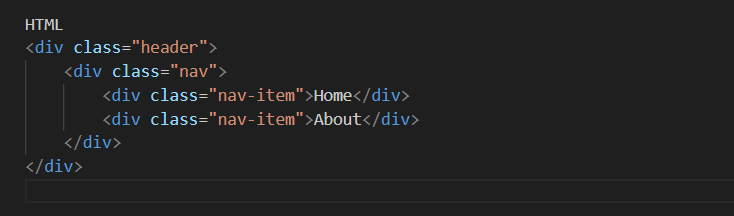
To a human browsing the site, the CSS makes this look like a header. But to an AI crawler or a screen reader, this is just a series of generic boxes. It has no soul. It has no meaning. In 2026, an AI bot looks at the code above and thinks: “I don’t know what this is. I’ll move on to a site that tells me exactly what its structure represents.”
Semantic HTML is about using tags that carry meaning. When you use a <header> tag, you aren’t just styling a box, you are telling the entire world: “This is the introductory content of my page.” This clarity is what allows AI to summarize your articles accurately and give you the credit (and traffic) you deserve.
2. The Core Architecture of a 2026 Web Page
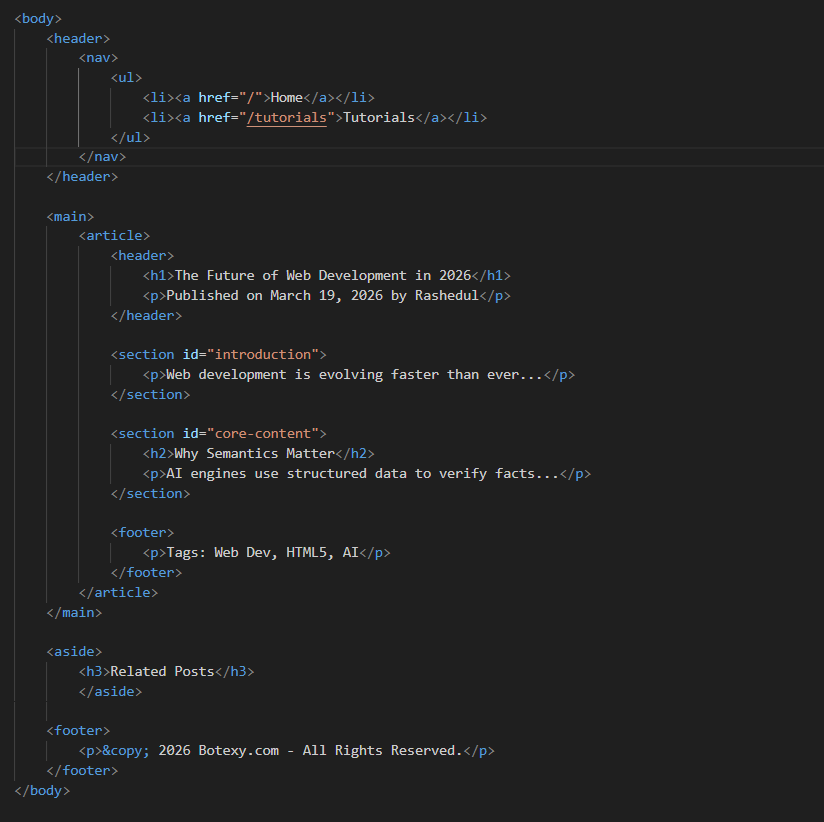
Let’s look at a real world example of how a professional, AI ready page should be structured. Imagine we are building a tech blog post for botexy.com.
The Header and Navigation
Every page needs a landmark. The <header> element is that landmark. Inside it, we use the <nav> tag. By using <nav>, you are signaling to search engines: “These are my primary internal links. Index these to understand my site’s hierarchy.”
The Main Event: <main> and <article>
This is where 90% of developers fail. You should only ever have one <main> tag per page. It tells the browser: “Everything inside here is the unique content of this specific URL.”
Inside that <main> tag, if you are writing a blog post or a news report, you must use the <article> tag. This is a signal to AI agents that the content inside is self-contained. If the AI “clips” this section, it should make sense on its own without the rest of the page.
3. Sectioning Your Content for AI "Chunking"
In 2026, AI search engines don’t always read your whole page. They “chunk” it. They look for specific sections that answer a user’s prompt. This is why the <section> tag is your best friend.
A <section> should always have a heading (<h2> through <h6>). If a section doesn’t have a heading, you probably shouldn’t be using a <section> tag—you should probably be using a <div>.
Think of it like this: If your blog post is a book, the <main> is the book itself, and the <section> tags are the chapters. If an AI is looking for “How to optimize images,” and you have a <section> with an <h2> titled “How to Optimize Images,” the AI can jump straight to that data, extract it, and cite botexy.com as the expert source.
4. The "Aside" and the "Footer": Contextual Awareness
The <aside> tag is often misunderstood. It’s not just for “sidebars.” It is for content that is indirectly related to the main content. This could be a glossary of terms, author bios, or related links.
By putting this info in an <aside>, you are telling the AI: “This is helpful, but it’s not the main point of the page.” This prevents the AI from getting confused and including your sidebar text in the summary of your main article.
The <footer> element isn’t just for the bottom of the page. You can have a footer inside an <article> to hold author metadata, or a footer for the whole site to hold copyright and contact info. It provides a “wrap-up” signal that helps machines understand where a thought process ends.
5. Accessibility (A11y) is Not Optional Anymore
In 2026, Accessibility and SEO are essentially the same thing. Google’s algorithms now weigh Core Web Vitals and User Experience so heavily that an inaccessible site will never rank #1.
When you use semantic tags, you get accessibility for free. A screen reader knows that a <button> is clickable. If you use a <div> and try to make it act like a button with JavaScript, a blind user – and an AI crawler – might not realize it’s interactive.
The Power of alt and aria
Every image must have an alt attribute. But in 2026, don’t just write “server icon.” Write: “A high performance NVMe server rack representing 2026 hosting standards.” This gives the AI context to index your images in visual search.
If you must use a non semantic element for a functional purpose, you must use ARIA roles. role=”button” or aria-label=”Close Menu” are the bridge between your custom design and the machine’s understanding.
6. Real World Case Study: Improving a "Web Solution" Page
Let’s take a common “Web Solution” landing page and transform it from “Average” to “Elite.”
Before (The Beginner Approach):
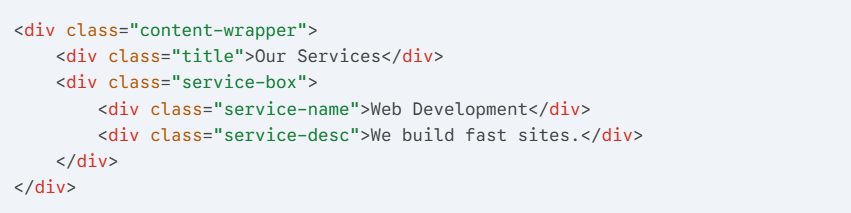
After (The Botexy Professional Approach):
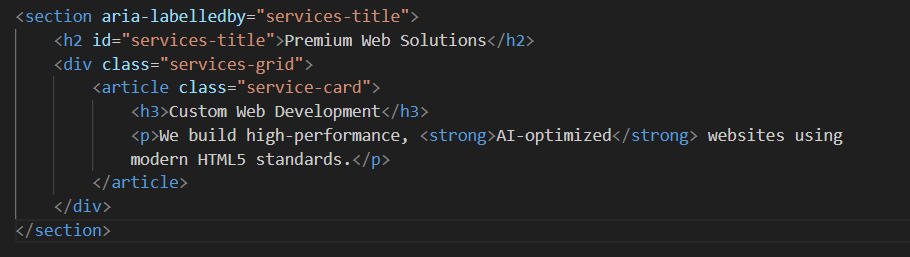
In the “After” version, we used aria-labelledby to link the section to its heading. We used <article> for the service because a service description is a standalone piece of information. This is the level of detail that gets a site approved for High CPC AdSense because it screams “Professionalism.”
7. SEO Benefits and High CPC AdSense Logic
Why am I obsessing over this? Because high-paying advertisers in the US technology market want to be associated with High Quality Content.
When an AdSense crawler visits your site, it looks at your HTML structure to determine the “Niche.” If your structure is perfect, the crawler accurately identifies you as a “High Authority Web Development Resource.” This triggers higher-value ads (like Enterprise Hosting or Software-as-a-Service ads) instead of low value generic ads. Clean code literally makes you more money.
8. Summary Checklist for Your Next Project
Before you hit “Publish” on your next piece of content for botexy.com, run through this mental checklist:
- Is there a <main> tag? (There should be exactly one).
- Are my headings logical? (Never jump from <h1> to <h3>).
- Am I using <article> for my core content? (It makes the content “portable” for AI).
- Are my images described for a blind person? (This is also how AI “sees” them).
- Did I use <nav> for my menus and <footer> for my legal/meta info?
- Is my “Div-Soup” factor low? (If you see five nested <div> tags, try to replace at least two with semantic elements).
The Expert's Edge
Mastering Semantic HTML5 in 2026 isn’t about following boring rules, it’s about communication. You are communicating with the browser, you are communicating with users with disabilities, and most importantly, you are communicating with the AI that will determine your site’s future.
As a professional developer, your code is your signature. Make it clean, make it meaningful, and make it undeniable. When you build with semantics, you aren’t just building a website, you are building a legacy that is ready for the next decade of the internet.

I’m Rashedul, a Web Developer and founder of Botexy Insights LLC. I analyze AI, web tech and digital security to deliver practical, data driven insights that help you stay secure, informed and ahead in the digital world.